
ServerLife - Tip Tracker
MZBApps LLCFinance
4.81.06K Reviews
- Version
- 2.1.53
- Installs
- 100.00K
- Age Rating
- Everyone
Screenshots
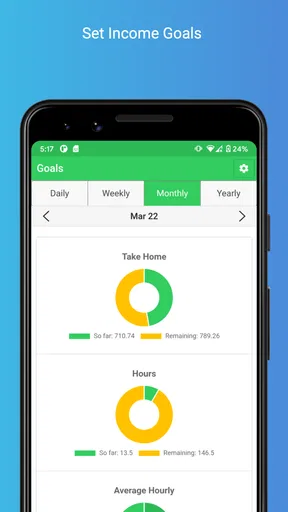
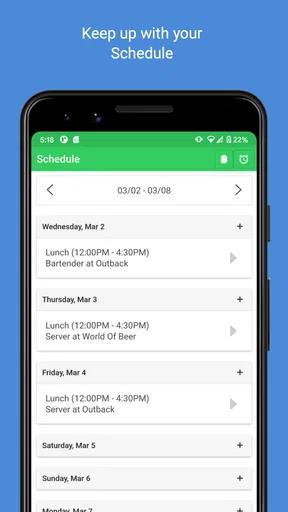
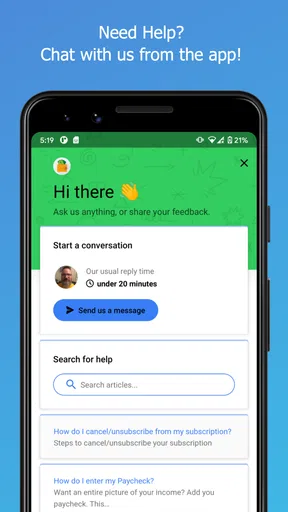
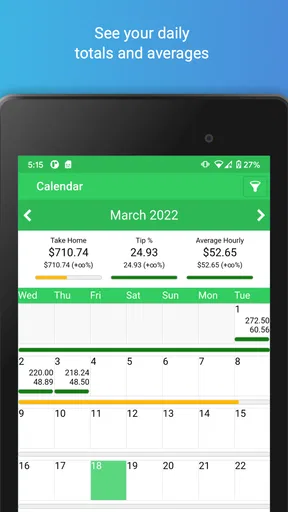
Our Review of ServerLife - Tip Tracker
 Analysis by Appyee
I would think of ServerLife - Tip Tracker less as a substitute for doing your taxes or running a full budget and more as a work diary for money that tends to arrive in bits: a shift here, cash tips there, wages later. That distinction matters. When income changes from one workday to the next, a clear record can be more useful than a polished budget built on guesses. The app is aimed at people in tipped roles, and its strongest case is helping turn irregular shifts into information you can actually use.
It is a free finance app from MZBApps LLC, with optional in-app purchases ranging from $0.99 to $19.99 per item. It is rated for Everyone, and the current version is 2.1.27. Its average of 4.8 from around 3.9K ratings and more than 100K installs suggest that the idea has found an audience, though the real test is whether you will keep entering each shift. I would recommend trying the basic routine before deciding whether any paid option is worthwhile.
Build a reliable record, one shift at a time
The useful starting point is a consistent entry habit, not a perfect financial system. After a shift, record the hours worked, tips, wages, and any relevant sales information while the details are still fresh. If you wait until the end of a busy week, it becomes easier to forget which money came from which shift or to mix cash tips with card tips. The app’s value grows as those separate entries build a history.
A realistic example: imagine finishing a dinner shift with cash in your pocket, card tips included in your pay, and a start and end time you want to remember. Logging the shift that evening lets you keep the pieces together instead of relying on a note in your phone or a memory that gets less precise by payday. Add a work-related purchase separately when it happens, and the record can give you a more grounded sense of what the shift actually left you with.
There is a small but important trade-off here. Recording tips promptly takes a little attention at the end of a tiring shift, but trying to reconstruct them later takes longer and is more error-prone. I would make the entry brief and repeatable: capture the essentials first, then add a detail only when it helps answer a real question, such as whether a particular shift or schedule is worth pursuing.
Check the setup before relying on the summaries
During setup, take care with job details and pay periods, especially if you have more than one employer or pick up work in different roles. Those choices shape how useful the later summaries will be. If two jobs have different pay cycles, keeping them distinguishable is more helpful than entering everything as one undifferentiated stream. That gives you a clearer way to review work patterns without treating one unusually strong night as typical income.
I would also decide what counts as an expense before logging one. A work shoe purchase is easy to identify; a meal grabbed between shifts may be more ambiguous, depending on how you personally track spending. The app can record expenses, but the usefulness of its net-earnings picture depends on your own consistent choices. Use the same rule each time, and you will be comparing like with like rather than changing the meaning of your totals from week to week.
For anyone wondering whether this replaces a spreadsheet or a budgeting app, I would say not necessarily. A spreadsheet gives you more freedom to build custom calculations, while a broad budgeting tool is usually better for seeing household bills, savings, and spending across accounts. ServerLife is the more natural fit when the detail you keep losing is shift-level income. It narrows the task to tipped work rather than trying to manage every part of your financial life.
Make the routine faster without losing useful detail
The best shortcut is a habit rather than a hidden button: enter a shift at the same point in your routine, such as when you get home or after you count cash. That cue reduces the chance of missing a day. If you work several jobs, use the job distinctions you set up instead of relying on memory to sort entries later. A few seconds spent choosing the right context can save confusion when you review a month.
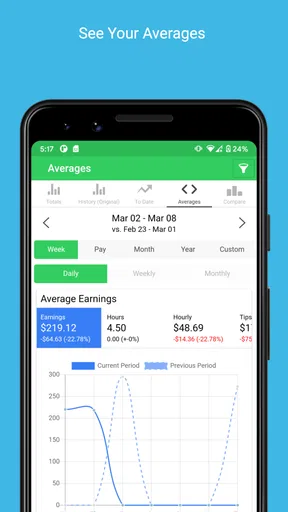
Sales and tip amounts can be useful together because they let you examine tip percentages, but I would avoid treating one shift’s percentage as a scorecard. Party size, service conditions, and the mix of cash and card payments can all affect a single result. The more sensible use is to look for a recurring pattern across comparable shifts—for example, similar days or roles—rather than changing your approach after one unusually good or poor night.
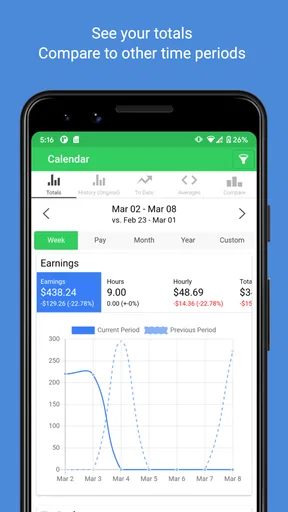
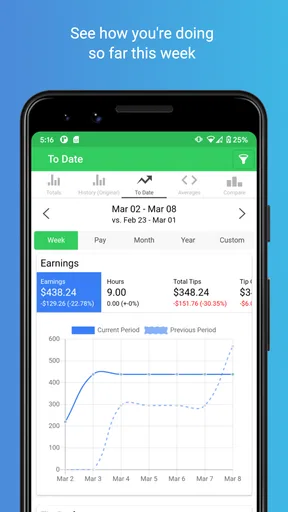
The weekly, monthly, and yearly views also serve different decisions. A short view helps you check whether you have recorded recent work; a longer one can reveal how much your income moves with seasons or scheduling. If you are planning around rent or another fixed bill, use several weeks of entries as a reality check instead of assuming the latest week will repeat. The app can organize the record, but it cannot make variable income predictable.
Know where a tracker stops being enough
There are limits to what this kind of tool can tell you. A recorded total is only as accurate as the entries behind it, and a tip tracker should not be treated as an official payroll record or tax filing system. Keep any employer statements and records you need for formal reporting. If you need detailed tax preparation, account syncing, or a household budget covering bills and savings, a dedicated tool for that job may be a better companion.
There is also a habit cost. If you dislike entering information after work, even a straightforward tracker can become another chore, and gaps in the log weaken the summaries. I would not choose it just because tracking sounds responsible; I would choose it if seeing how shifts, tips, hours, and expenses relate to each other would change a decision you make. Someone with steady salary income and no need to compare shifts may get little from its specialized focus.
Some features are paid, so I would first see whether the free experience covers the details you actually need. The app is free to start, but optional purchases are available; do not assume every extra is essential to the basic tracking routine. The most useful test is practical: can you enter a normal week comfortably, and do the resulting summaries answer a question you care about? If not, paying for more is unlikely to fix a mismatch in habits or needs.
Getting Started with ServerLife
Downloading and setting up ServerLife - Tip Tracker is as smooth as a well-made cocktail. Available on both Android and iOS, the app welcomes you with a clean, intuitive interface. No rocket science here—just a straightforward setup that asks for your job details, pay periods, and any secondary jobs if you’re juggling multiple gigs.
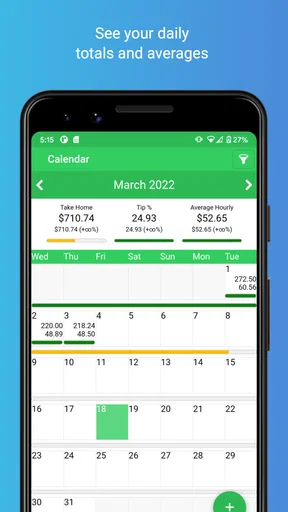
Once you’re in, you’ll notice the app’s main screen is all about efficiency. It’s like having your own personal accountant but without the hefty fees. You can add your daily tips, track your hourly wages, and even note any cash tips versus credit card tips. It’s designed to give you a comprehensive view of where your money is coming from and how it’s stacking up over time.
Features That Stand Out
What really caught my eye is the app’s ability to break down your earnings by week, month, or year. This is a game-changer for anyone who has ever tried to budget without a clear picture of their income. The graphs are visually appealing and easy to understand, making it a breeze to see trends and make informed financial decisions.
Another feature worth mentioning is the shift tracking. You can log your start and end times, which is perfect if you’re trying to optimize your schedule or just want to make sure you’re not losing any hours. Plus, the app allows you to record any sales made during your shift, making it easier to calculate those all-important tip percentages.
Keeping Tabs on Expenses
Let’s be real—working in the service industry often means incurring daily expenses, whether it’s buying new work shoes or grabbing a quick meal between shifts. ServerLife has thought of this too. The app lets you log your expenses, providing a clear picture of your net earnings. It’s like having a financial diary where you can jot down everything from uniform purchases to that much-needed cup of coffee.
A Community of Support
One of the most interesting aspects of ServerLife is its community feature. You can connect with other users, share tips and tricks, and even get insights into how others are maximizing their earnings. It’s not just an app; it’s a community of people who understand the grind and are eager to help each other out.
Things to Keep in Mind
While ServerLife is packed with features, it does come with a learning curve. If you’re not used to tracking your finances, it might take a few days to get into the routine of logging tips and shifts. But trust me, once you get the hang of it, you’ll wonder how you ever managed without it.
Another point worth noting is that some features require a premium subscription. While the free version is quite robust, the added functionalities of the paid version might be worth the investment if you’re serious about getting your financial house in order.
The Final Word
In the end, ServerLife - Tip Tracker is more than just an app; it’s a lifeline for anyone working in the tipping industry. It simplifies the daunting task of tracking income and expenses, allowing you to focus more on what you love—providing excellent service and maybe snagging that extra tip or two.
If you’re tired of playing the guessing game with your finances, give ServerLife a shot. It’s like having a pocket-sized financial advisor, minus the judgmental looks. And who wouldn’t want that?
Verdict
Strengths of ServerLife - Tip Tracker
- Easy to navigate interface.
- Accurate tip tracking system.
- Customizable income categories.
- Detailed income reports.
- Supports multiple job entries.
Limitations of ServerLife - Tip Tracker
- Limited free version features.
- Occasional sync issues.
- No desktop version available.
- Ads can be intrusive.
- Requires manual data entry.
Similar Picks in This Category
View All
Google Wallet
Google LLC4.3

Airtel: Recharge, Bank & Loans
Airtel4.0

PayPal - Pay, Send, Save
PayPal Mobile4.2

DANA Indonesia Digital Wallet
PT Espay Debit Indonesia Koe4.5

Binance: Buy Bitcoin & Crypto
Binance Inc.4.8

Cash App
Block, Inc.4.7
Frequently Asked Questions
What is ServerLife - Tip Tracker and how does it work?
ServerLife - Tip Tracker is an app designed to help servers and bartenders track their tips and earnings efficiently. By logging daily tips and working hours, users can see detailed reports and trends over time. The app provides insights into average earnings, busiest shifts, and total income, making financial planning easier.
Is ServerLife - Tip Tracker free to use?
ServerLife offers both free and premium versions. The free version includes basic features like tip tracking and income reports. The premium version, available through a subscription, unlocks additional features such as advanced analytics, customizable reports, and ad-free usage. Users can choose based on their needs.
Which devices and operating systems support ServerLife - Tip Tracker?
ServerLife - Tip Tracker is available for both Android and iOS devices. It requires a minimum operating system version, typically Android 5.0 and iOS 11.0 or later, to ensure compatibility and optimal performance. Users can download the app from the Google Play Store or Apple App Store.
Can I track multiple jobs and shifts with ServerLife - Tip Tracker?
Yes, ServerLife allows you to track multiple jobs and shifts. Users can add different workplaces, customize hourly rates, and log shifts separately. This feature helps those with multiple gigs to manage their earnings comprehensively, providing a clear overview of income from each job.
How secure is my data with ServerLife - Tip Tracker?
ServerLife takes data security seriously by using encryption to protect users' information. The app does not require unnecessary permissions, and users have the option to back up their data securely. Regular updates ensure enhanced security measures to protect personal and financial details.
